Category Archives: Uncategorized

Installer Maker 1.6.1 Standalone Edition

Installer_maker_box_64px

About a year and a half ago, Economy-x-Talk released the Installer Maker as a plugin for LiveCode (still Revolution at the time). One of the limitations of the plug-in is that other stacks should be closed before building an installer in the IDE.

We have received many requests to get around this limitation. As a solution, a standalone version of the Installer Maker is now offered. This means that you can experiment in the IDE, save your stacks to your standalone folder, and immediately re-build your installer, without having to set up everything again (as long as you keep Installer Maker running).

Moreover, from now on the Installer Maker allows you to build a test installer without buying a license first. You can run the test installer on the computer on which it is built.

Installer Maker 1.6.2 is the first version that is also available as a standalone. There might be a few small glitches, which will naturally get fixed in due time.

Please, show me that our efforts to meet your requirements are not in vain and upgrade your license or buy one if you haven’t one yet 😉

You can download Installer Maker at
http://installermaker.economy-x-talk.com/

and the Installer Maker Plugin for LiveCode at
http://rrinstallermaker.economy-x-talk.com/

Zip files and folders (including empty folders) with LiveCode

/*
iZip 1.0.1
Make a zip file recursively without the
need for a callback message. This script includes empty folders
if there are any.
—————————————————————-
Usage: iZip path[,true|false]

Parameters:
The first parameter is a string containing the path to a file or
folder. The zip file will have the same name as the original
file or folder, appended by “.zip”, and is created in the same
directory as the original.
The second parameter is a boolean excluding “.DS_Store” files if
true and includes them if false or empty.

Error messages:
If the zip external encounters a problem, an  error message is
returned of the form “error: file not open”.

Comment:
You need to write your own script to check that the revZip
external is available.

Copyright © 2011 by Economy-x-Talk
http://www.economy-x-talk
This script is free to use. Please give credit if you do. Always
include this copyright notice in a visible place in your
software.
*/
on iZip theFile,theExcludeDsStore
     if not (there is a file theFile or there is a folder theFile) then
          return “error: file not found”
     end if
     set the itemDel to slash
     put number of items of theFile into myAbsolutPathLength
     put theFile into myFolderlist
     put theFile & “.zip” into myZipFile
     // need to zip the whole thing recursively
     // item names should probably be the relative folder paths
     put the directory into myOldDir
     put 0 into myCounter
     revZipOpenArchive myZipFile,”write”
     put the result into rslt
     if rslt is not empty then
          set the itemDel to comma
          return “error:” && item 2 of rslt
     end if
     if there is a file theFile then
          put last item of theFile into myItemName
          revZipAddItemWithFile myZipFile,myItemName,theFile
          put the result into rslt
          if rslt is not empty then
               set the itemDel to comma
               return “error:” && item 2 of rslt
          end if
     else // folder
          repeat forever with messages
               add 1 to myCounter
               put line 1 of myFolderList into myCurrentFolder
               // add folder
               put item myAbsolutPathLength to -1 of
                      (myCurrentFolder & “//”) into myItemName
               revZipAddItemWithFile myZipFile,myItemName,””
               put the result into rslt
               if rslt is not empty then
                    set the itemDel to comma
                    return “error:” && item 2 of rslt
               end if
               set the directory to myCurrentFolder
               put the files into myFileList
               // zip the files
               repeat for each line myFile in myFileList with messages
                    if (myFile is “.” or myFile is “..”) or
                           theExcludeDsStore is true and myFile is
                           “.DS_Store” then next repeat
                    put item myAbsolutPathLength to -1 of
                           (myCurrentFolder & slash & myFile) into
                           myItemName
                    if char -4 to -1 of myFile is “.zip” then
                         revZipAddUncompressedItemWithFile
                                myZipFile,myItemName,myFile
                    else
                         revZipAddItemWithFile myZipFile,myItemName,myFile
                    end if
                    wait 0 millisecs with messages
               end repeat
               put the folders into myTempFolderList
               repeat for each line myFolder in myTempFolderList
                    if myFolder is “.” or myFolder is “..” then next repeat
                    put cr & myCurrentFolder & slash & myFolder after
                           myFolderList
               end repeat
               delete line 1 of myFolderList
               if number of lines of myFolderList is 0 then exit repeat
               wait 0 millisecs with messages
          end repeat
     end if
     revZipCloseArchive myZipFile
     put the result into rslt
     if rslt is not empty then
          set the itemDel to comma
          return “error:” && item 2 of rslt
     end if
     set the directory to myOldDir
end iZip

What is a reasonable privacy statement?

Here’s my rather personal interpretation of a privacy policy statement. As a source, I used the Daily’s statement. You can find the full text here http://www.thedaily.com/privacy/ . I might be slightly exaggerating, maybe not. Honestly, I don’t know. Just read it.

“When you use the Services, we may collect certain non-personally identifiable information about that use. For example, […], our servers receive and record information about your computer and browser, including potentially your IP address, browser type, and other software or hardware information. […] we may also collect transactional information such as a unique device identifier assigned to that device (“UDID”), your geolocation, or other transactional information for the device in order to serve content to it. We also may use cookies and other tracking technologies […], which are comprised of small bits of data that often include an anonymous unique identifier.”

If you use our services, we will know who you are, where you are, what you do and with whom you do it.

“Third parties […] may also use these technologies […]. We do not control these third-party technologies and their use is governed by the privacy policies of third parties using such technologies. For more information about third-party ad networks that use these technologies, see www.aboutads.info.”

We work together with companies that collect the same information and we don’t care about their ethics. Oh, yeah, apparently we use it for ads mainly.

“Most browsers are initially set to accept cookies, but you can change your settings […] to block cookies altogether. […] Please note that by blocking any or all cookies you may not have access to certain features or personalization available through the Services.”

If you prevent us from earning money with advertisements, we might treat you badly.

“Third Parties. To improve the quality of our services, we may also supplement the information we collect with information we obtain from other users, business partners and other companies.”

We cross-link databases! (Is that legal?!).

“If you access the Services through a third-party connection or log-in, we may also collect your public user ID […] and any information you have made public in connection with that service and which the third party shares with partner services.”

We will spy on you.

“The Services are hosted in the United States. If you are a user located outside the United States, you understand and consent to having any personal information you provide transferred to and processed in the United States.”

We may help the CIA to spy on you.

“The Services may also be linked to websites and other services […]. We are not responsible for the privacy practices of any such third parties, and once you leave our website via a link, enable a third-party service, or click an advertisement, you should check the applicable privacy policy of the third-party site.”

Although we share your data with everyone and everyone shares your data with us, we don’t care what our partners to with this data. You’re on your own, dude!

“We only share your non-public personal information with non-affiliated third parties when we believe sharing is permitted by you or authorized by this Privacy Policy.”

We do what we believe is right.

“The Daily may periodically send promotional materials […]. If you want to stop receiving promotional materials from the Daily, you can follow the unsubscribe instructions […]. There are certain service notification emails that you may not opt-out of […].”

We will push the spam up your….

“We may make your non-public personal information available to […] contractors, agents or sponsors […]. These service providers are required to protect any personal information entrusted to them and not use it for any other purpose than the specific service they are providing to the Services.”

We can use your data for any third-party service we like.

“There may be instances when we may access, preserve and disclose user information without providing notice or choice, if required to do so by law or if based on a good faith belief that such access, preservation or disclosure is reasonably necessary to (a) comply with the law or legal process; (b) enforce this Agreement; (c) respond to claims that any content or information violates the rights of any third party; (d) respond to your requests for customer or technical service; or (e) protect the rights, property or personal safety of Company, users or any third parties including acting in urgent circumstances.”

…and just in case we haven’t made clear that we don’t really care, let’s repeat once more…

“We may also retain backup information related to your account on our servers for some time after cancellation for fraud detection or to comply with applicable law or our internal security policies.”

Once we got you hooked…

I have to say, the Daily is kind of honest. After all, they do tell you exactly what they might do with your personal information. Unfortunately, most people just don’t read this kind of stuff and are utterly surprised when they discover their data ending up all over the commercial world. If you decide to accept the terms, either with or without reading, it is your own fault. The only question that really bothers me is: can all those companies issuing endless privacy statements reasonably expect from their partly illiterate customers to read all this stuff?!

Compression Tool for Mac OS X

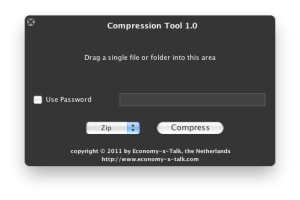
Here’s a little gift for you. A long time ago, I needed to be able to create zip files that don’t include the .DS_Store files. The zip routine of Economy-x-Talk’s Compression Tool doesn’t include these files and thus produces a nice clean file suited for distribution amongst Windows users.

Screen_shot_2011-01-30_at_20

Besides zip files, this utility also created files in gzip, tar and tgz (gzipped tar) format. All formats can be decompressed by Mac OS X, except for zip files with password protection.
For now, this utility compresses only. Decompression features may be added later. Go to our website to download Compression Tool. There, you can also read more about it.

A Game for Kids: Multiplication Bingo

Bingo_icon_128px

Economy-x-Talk and Judy Perry co-operated to create a nice attractive little game for kids. Multiplication Bingo is a fun way to learn your multiplication tables. Based upon the easy and popular game of Bingo, it presents the learner with a randomized series of multiplication problems within each multiplication family. The greater the number of correct responses, the greater likelihood of achieving bingo. There are at least two opportunities to achieve bingo for each family (included are twos through twelves).

Screen_shot_2011-01-28_at_23

The learner can select a particular family to work on or can choose from three sets of bingos containing problems from multiple families. Bright colours, easy-to-read numbers and fun sound effects combine to make this an enjoyable way to learn multiplication. Created by a teacher for her own children to learn their multiplication tables. Even though they’ve since moved beyond that need, they still love to play it. Kid tested and approved!

You can download Bingo from our website at http://bingo.economy-x-talk.com and after purchase your license is sent to you automatically —no waiting, instant joy!

Get current remote connections with LiveCode on MS Windows XP/Vista/7

This is a script to check the remote desktop connections to your computer. Syntax:

rdConnection([false]|true|”User”)

where User is the name of a user with an account on that particular computer (or server).

Paremeters:
false: returns true if connections have been established, false of not
true: returns the names of the currently logged in users
user (in quotes): returns true if that particular user is logged in, false otherwise

function rdConnection theName
   if the platform is not “Win32” then return empty
   set the hideConsoleWindows to true
   put shell(“qwinsta”) into myConnections
   filter myConnections with “*Active*”
   if theName is empty or theName is false then
      repeat for each line myLine in myConnections
         if word 4 of myLine is “Active” then
            put myLine & cr after myNewList
         end if
      end repeat
      delete last char of myNewList
      return (myNewList is not empty)
   else if theName is true then
      repeat for each line myLine in myConnections
         if word 4 of myLine is “Active” then
            put word 2 of myLine & cr after myNewList
         end if
      end repeat
      return myNewList
   else // theName is not empty
      if word 2 of myLine is theName then
         put myLine & cr after myNewList
      end if
      delete last char of myNewList
      return (myNewList is empty)
   end if
end rdConnection

Installer Maker Plugin 1.5.1 for LiveCode has been released – Happy New Year!

Hello! Happy New Year to all of you! I wish you all success in business and carreer and happiness in your family!

Economy-x-Talk has released a new version of the Installer Maker Plugin. This update fixes a problem that prevented Linux users from registering and several other smaller problems. More info can be found at http://rrinstallermaker.economy-x-talk.com/ .

Screen_shot_2010-12-13_at_16

This update is free for everyone who bought a (new) license during the past 3 months. Upgrades are available at half the original price.

Make PHP and MySQL communicate on Mac OS X 10.6 Snow Leopard

I write this blog post because every few months I need make PHP and MySQL work on Mac OS X and every time I have to figure it all out again. Time to write it down…

The following instructions consider Mac OS X 10.5 and 10.6 (Leopard and Snow Leopard).

Almost always people start shouting “MAMP!” as soon as people have problems with PHP and MySQL on Mac OS X. It is nonsense to install MAMP on a Mac because almost everything is already installed on your Mac. Why would you install all necessary server software twice? It just takes away hard disk space. You really don’t need to use MAMP. All you need is to figure out how to configure PHP and MySQL.

Obviously, before PHP can work with MySQL, you need to install MySQL. You can download MySQL for Mac OS X here http://www.mysql.com/downloads/mysql/ . Install MySQL and don’t forget to install the preferences panel that comes with it.

Now you can activate PHP. Type command-shift-G in the Finder and type /etc/apache2/ in the little window that appears. Click on Go en find the file httpd.conf in that folder. Copy this file to the desktop and create a backup copy named httpd.conf.old.

Open the file httpd.conf in TextEdit and search for the line containing

#LoadModule php5_module libexec/httpd/libphp5.so

Remove the # and save the file. Copy the modified file to /etc/apache2/ en cofirm if you are asked whether you want to replace the existing file.

When PHP tried to communicate with MySQL, it uses a socket file to contact MySQL. PHP expects o find this file in /tmp/mysql.sock while MySQL puts the file into /var/mysql/mysql.sock. It has been like this for year and I really don’t understand why the two parties involved don’t solve this.

The “temporary”solution is to tell either PHP or MySQL to create or search the socket file somewhere else. The easiest way (in my personal opinion) is the following.

1) open TextEdit and type the following four lines:

[mysqld]
socket=/var/mysql/mysql.sock
[client]
socket=/var/mysql/mysql.sock

2) Save this text file at the location: /etc/my.cnf

You may be unable to save the file in /etc right-away. In this case, you can save the file on your desktop first. Type command-shift-G (in the Finder) and type /etc in the little window that appears. If you click on Go, you will see a Finder window displaying the content of folder /etc. Now you can copy the file my.cnf to the folder /etc. You may need to enter your admin name and password when you copy the file.

Now you need to turn off and on Web Sharing in the System Preferences. You may need to turn off and on MySQL too, which you can do in the MySQL preferences panel.

PHP should now be able to use MySQL.