Category Archives: Uncategorized

How to block trending articles in Facebook?

I kept getting those pesky trending articles in Facebook, which are actually advertisements. I can’t confirm it, but I think that companties pay Facebook to have their articles posted to your timeline as soon as you or one of your (remote) friends gets on their website. This feature is in my top 3 of most-hated Facebook features.

If you look closely at the trending article post in your timeline, you will se the name of an app, e.g. Yahoo, MSNBC or The Independent. Those aren’t websites but Facebook apps and thus you can block them.

Click on the little white triangle next to the Home menu (in the top-right of the Facebook page).

Screen_shot_2012-07-08_at_21

and choose Privacy Settings from the menu.

0screen_shot_2012-07-08_at_21

Click on the link Manage Blocking at the bottom of the page.

1screen_shot_2012-07-08_at_21

You need to scroll down to the “BLock Apps” section. You willsee a field, where you can write the name of an app. If you write Yahoo, a list of Yahoo-options will appear and you can choose the one that annoys you. As soon as you choose an option, the app will no longer post to your timeline.

Screen_shot_2012-07-08_at_21

As you can see, I block everything that isn’t posted directly by a friend, app or page that I added to my timeline myself.

Please, write a comment to this blog post if you know a better solution.

Use Ashot to Capture Apps running on Android Device

I’m developing a web app for a customer of Economy-x-Talk and needed a way to record demos for the customer. The web app will mostly run on Android and I was trying to make screenshots and videos with my Android tablet but couldn’t get it to work without hacking around in places that I’d rather leave alone at this point.

So, I searched the net and found Ashot. Ashot appears to work almost entirely “just like that” on my Mac OS X machine. This is what I did.

1) First I downloaded Ashot for Mac.

2) Next I downloaded and installed the Android SDK (actually, I had it installed already) and copied the file /Developer/android-sdk-mac_x86/platform-tools/adb to /Developer/android-sdk-mac_x86/tools/adb.
3) On my Android, I opened Settings/Apps, activated Unknown Sources (I don’t know if this is really necessary but it worked for me) and selected Settings/Apps/Development where I activated USB Debugging and Stay Awake.

4) Then I connected my Android tablet to one of the two on-board USB ports of my Mac

5) I turned on the tablet and fired up Ashot-1.1.jar and chose Set Capture Folder from the file menu and set it to my Downloads folder. Later I changedit to another folder inside my Downloads folder. I suppose you might want to use a folder inside your documents folder.

6) I chose Set Android SDK Folder from the File menu and opened /Developer/android-sdk-mac_x86/.

7) I restarted Ashot-1.1.jar and it connected to my tablet automcatically.

Screen_shot_2012-06-28_at_11

The app also has a few downsides. Sounds are not recorded and it only captured PNG files.

If you start a “movie” capture, it just starts making many PNG files and you need to make a movie out of it yourself. You can use PowerPoint, iPhoto, HyperStudio and even GIMP to make movies or GIF animations.

The default background is black. You can change it in the Options window, but the change has an effect only after restarting Ashot.

The app is rather slow and won’t let you make a smoothly playing movie, but I think it is sufficient for a live demo with a beamer for example and at least this app lets you make screenshots of apps running on your device.

Download an application package here

Launcher X – a classic dock replacement

Remember the Mac OS Classic application Launcher? Launcher X is a replacement for everyone who still isn’t used to the dock of Mac OS X —or for everyone who likes to have some fun with a Classic feature on Mac OS X.

Screen_shot_2012-05-14_at_03

If you don’t know about Mac OS 9, you might want to know what Launcher X does. Just drag any file, application of folder into the Launcher X window and a link to the item is created. When you click once on the icon in Launcher X, the application, folder or file with open right-away.

Because Launcher X has the ability to create multiple groups of icons, you can store many more icons in Launcher X then in the dock of Mac OS X. Moreover, you can organise your groups the way you like. You’re not forced to keep applications on the left and folders and files on the right, as with the OSX dock.

Launcher X was created with Livecode. If you are interested in Launcher X, just drop us a note. Go to http://economy-x-talk.com and fill out the contact form. We will reply with a download link.

How to make Internet Explorer start with blank page in Windows 8

Internet Explorer has the annoying habit to start with the MSN homepage, even if you tell it not to do so. Here’s how to make sure that IE doesn’t display the MSN homepage on startup anymore.

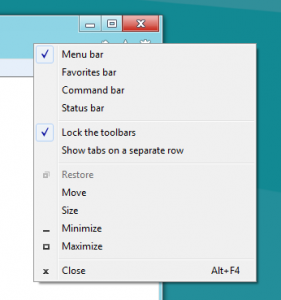
First, right-click in the tool bar of the Internet Explorer window (to the right of the address bar). A menu appears as displayed in the picture below.

Screen_shot_2012-04-28_at_17

If no checkmark is displayed in front of menu item “Menu bar” then click on this menu item to make the checkmark appear. A menubar will become visible in the Internet Explorer window.

0screen_shot_2012-04-28_at_17

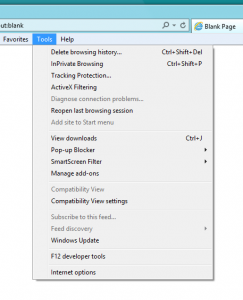
Open the Tools menu of Internet Exploror and choose the “Internet options” menu item. A new window will appear now, with the name Internet Options.

If the General tab is not active then click on the General tab at the top of the window. In the field in the Home page section, you will find a URL that leads to the MSN homepage. You might also find some other URLs. Delete all URL’s by clicking in the field once, typing Control-A followed by the Return key (or the Enter key). Now replace the deleted URL’s with “about:blank” (without quotes). Don’t leave the field empty, because Microsoft will still load a website for you if you don’t enter “about:blank”.

1screen_shot_2012-04-28_at_17

Now you can click on the OK button at the bottom of the window. Close and reopen Internet Explorer. Your new IE window should now open with a blank page.

Turn Off BTServer (Mac OS X)

Every time when I woke up my MacBook, the process BTServer started to run at 140% CPU power and the fan would blow like crazy. Looking for a solution, I found that this problem is quite common, but I couldn’t find complete instructions to solve this problem.

I searched my Mac for files with BTServer in their names and found com.apple.BTServer.txt among other names. The file is in a folder called launchDeamons, which gave me a clue.

The only website I could find, mentioning both the file and high CPU usage, is at: http://qery.us/1vu . Below follows what I did after reading the site.

First open folder /Developer/Platforms/iPhoneSimulator.platform/Developer/SDKs/iPhoneSimulator5.0.sdk/System/Library/LaunchDaemons/ and locate the file com.apple.BTServer.txt. Copy this file to your desktop. Before continuing, you might want to duplicate the file first.

Open it in TextEdit by right-clicking (or control-clicking) on it and choosing Open With>TextEdit from the popup menu. Find the text

<key>Disabled</key>
    <false/>

and change it into

<key>Disabled</key>
    <true/>

The website doesn’t mention it, but there is also a key KeepAlive containing

<key>SuccessfulExit</key>
        <true/>

I might be overdoing things, but I set this key to false too:

<key>SuccessfulExit</key>
        <false/>

Now save and close the file. Drag the file back into aforementioned folder. When you’re asked if you want to replace, click on Replace. When you’re asked to authorize this action, allow it and enter your password when asked for.

At first this didn’t work for me, but after I restarted the Mac, the problem seemed to have gone away.

MySQL for the Absolute Beginner: Select Data from Multiple Tables

In this blog post, I use a very simple example to answer the question how to select data from two different tables in a MySQL database.

Start with creating a database. Now create 2 tables:

CREATE TABLE t1 (col1 VARCHAR(1),col2 INT(1));
CREATE TABLE t2 (col3 VARCHAR(1),col4 INT(1));
INSERT INTO t1 VALUES (‘a’,1),(‘b’,2),(‘c’,3);
INSERT INTO t2 VALUES (‘x’,1),(‘y’,2),(‘z’,3);

Now do a joined select and notice that you can one very big table:

SELECT * FROM t1,t2

output:
a     1     x     1
b     2     x     1
c     3     x     1
a     1     y     2
b     2     y     2
c     3     y     2
a     1     z     3
b     2     z     3
c     3     z     3

However, if col2 of t1 and col4 of t2 are identifiers for the same subjects, we can use these keys to display only rows that make sense:

SELECT * FROM t1,t2 WHERE col2=col4

output:
a     1     x     1
b     2     y     2
c     3     z     3

We can adjust this statement to get only the information we want, e.g. all information from both tables about subject x:

SELECT * FROM t1,t2 WHERE col2=col4 AND col3=’x’

Suppose that the two columns col2 and col4 have the same name, e.g. ‘id’ (which would make sense) then we would write:

SELECT * FROM t1,t2 WHERE t1.id=t2.id AND col3=’x’

and if we only need to know col1 (because the id column is really just an identifier and doesn’t contain information we need and we use col2 to identify subject x, which is information we already have) then we can write:

SELECT col1 FROM t1,t2 WHERE t1.id=t2.id AND col3=’x’

output:
a

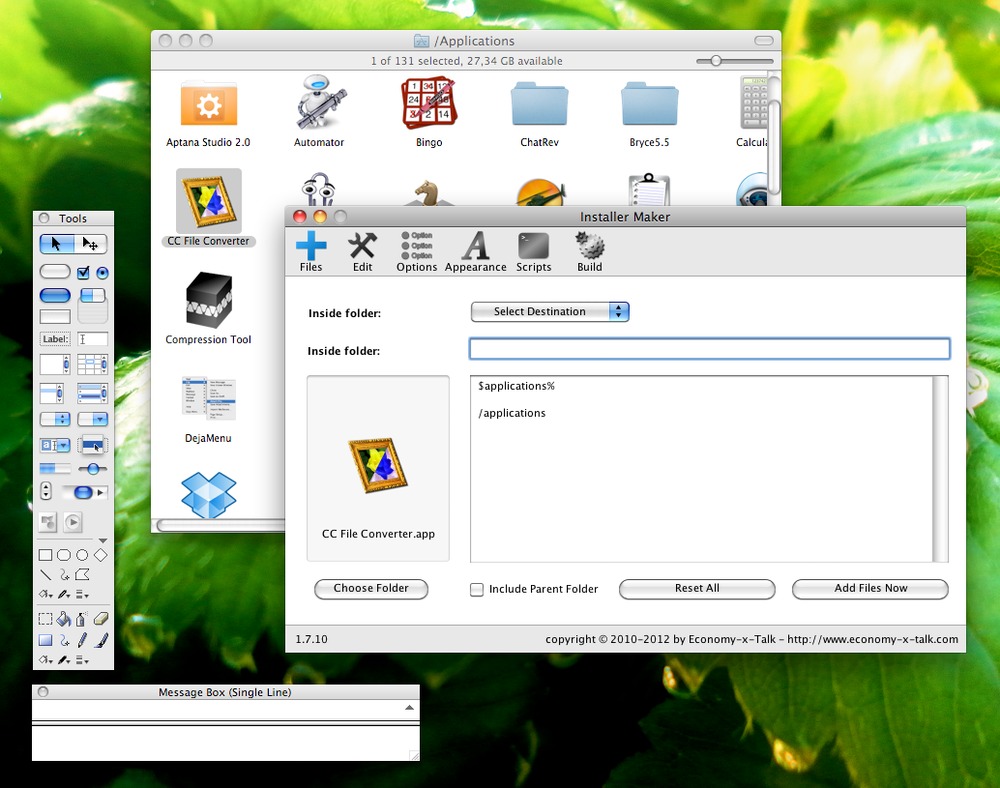
Installer Maker 1.7.4Sb01 Available for Testing!

Installer Maker is a programme that wraps your software in a nice and easy installer. Installer Maker 1.7.4Sb01 contains more than 20 new features and bug fixes. Installer Maker creates installers of your software for Mac OS X and Windows and is especially convenient for users of RAD environments such as RealStudio, SuperCard and LiveCode.

Currently, the official standalone version of Installer Maker is 1.6.1. This version is almost a year old. During that year, we added many new features, which were included in the plugin version for LiveCode but not in the standalone version. We are now releasing Installer Maker 1.7.4Sb01, which includes all new features.

Pastedgraphic-1

Note that 1.7.4Sb01 is a beta version. It may work or fail completely. Economy-x-Talk doesn’t bear any responsibility for any problems caused by Installer Maker. See also our business terms and the license included with the software.

There are 4 different versions (for Mac OS X PPC, Mac OS X Intel, Mac OS X Universal and for Windows), which you can download here.

Do you like Installer Maker? You can buy a license with a 25% discount until Friday 9 March! Go to http://qery.us/1v7 to get your discount! The discount applies to both the standalone and the plugin version of Installer Maker.

Installer Maker 1.7.4Sb01 Available for Testing!

Installer Maker is a programme that wraps your software in a nice and easy installer. Installer Maker 1.7.4Sb01 contains more than 20 new features and bug fixes. Installer Maker creates installers of your software for Mac OS X and Windows and is especially convenient for users of RAD environments such as RealStudio, SuperCard and LiveCode.

Currently, the official standalone version of Standalone Maker is 1.6.1. This version is almost a year old. During that year, we added many new features, which were included in the plugin version for LiveCode but not in the standalone version. We are now releasing Installer Maker 1.7.4Sb01, which includes all new features.

Pastedgraphic-1

Note that 1.7.4Sb01 is a beta version. It may work or fail completely. Economy-x-Talk doesn’t bear any responsibility for any problems caused by Installer Maker. See also our business terms and the license included with the software.

There are 4 different versions (for Mac OS X PPC, Mac OS X Intel, Mac OS X Universal and for Windows), which you can download here. Do you like Installer Maker? You can buy a license with a 25% discount until Friday 9 March! Go to http://qery.us/1v7 to get your discount! The discount applies to both the standalone and the plugin version of Installer Maker.

Installer Maker Plugin for LiveCode 25% Off

It’s Spring and that’s a good time to do something nice. Economy-x-Talk is offering all new customers a 25% discount on a license for the Installer Maker Plugin for LiveCode. IM for LC is an easy way to make installers for Windows and Mac OS X with nothing but LiveCode. Please go to http://qery.us/1v7 for more info about the discount and the Installer Maker Plugin. The discount is available until Friday 9th March 2012.