Speakable Password Generator

Here’s a script, which I just posted to the Revolution forum. I post it on my blog, because I like the script and it might be useful to many people. It should also be simple to translate this to PHP for instance.

This script generates passwords with length theLength, choosing consonents and vowels semi-randomly such as to keep the password speakable. This function allows for double consonants while still keeping the password speakable.


function speakablePassword theLength
     put “bcdfghjklmnprstwyz” into myConsonants
     put “aeiou” into myVowels
     put “” into myPass
     repeat myPasswordLength
          if char -1 of myPass is in myConsonants then
               if char -2 of myPass is in myConsonants or
                  length(myPass = 9) then
                    put any char of myVowels after myPass
               else
                    if any item of “true,false” then
                         put any char of myVowels after myPass
                    else
                         put any char of myConsonants after myPass
                    end if
               end if
          else
               put any char of myConsonants after myPass
          end if
     end repeat
     return myPass
end speakablePassword

How to set up shortcuts with the Installer Maker Plugin for Runtime Revolution?

A few days ago, Economy-x-Talk’s support department received a question about creating shortcuts with the Installer Maker Plugin for Runtime Revolution. More specifically, a user of the plug-in asked how to set up the installer as to create shortcuts in the start menu and on the desktop. Here’s the answer.

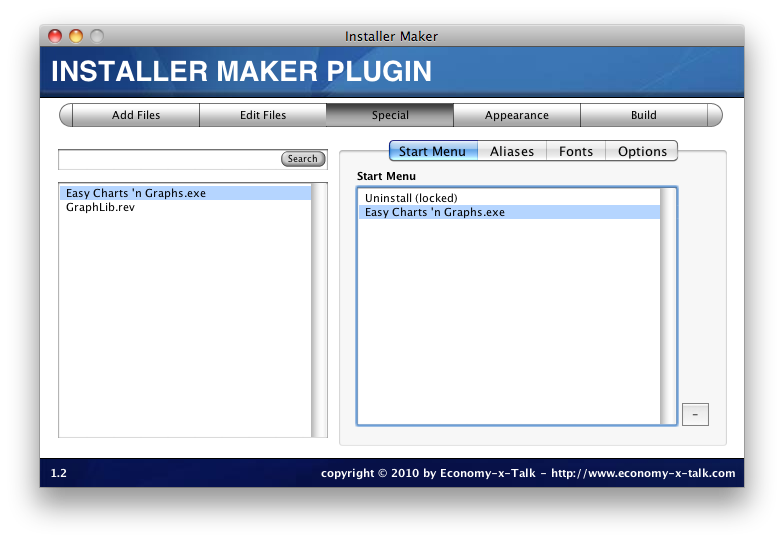
To add shortcuts to the Start menu on Windows, follow the following steps after you have added all necessary files:
1) go to the Special section
2) select the Start Menu tab button on the Special section
3) drag any file (e.g. the main executable file) from the list on the left into the list on the right

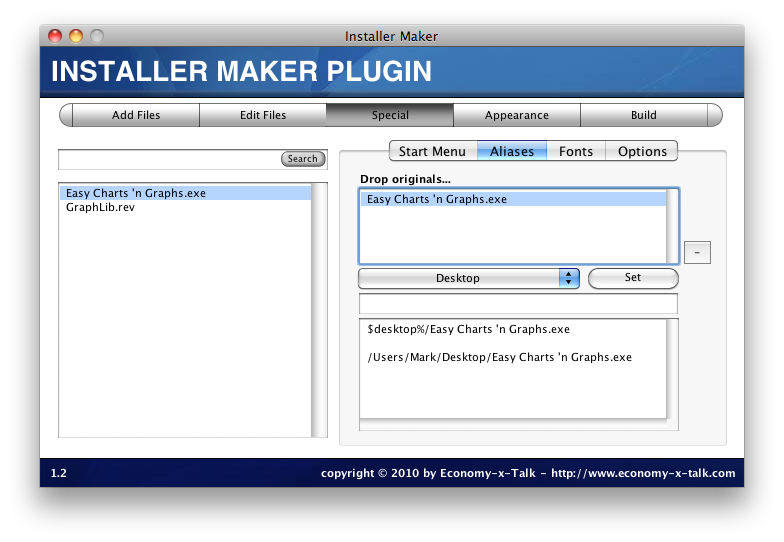
If you want to have a shortcut on the desktop, follow the following steps.
1) go to the Special section
2) select the Aliases tab on the Special section
3) drag a file (e.g. the main executable) from the list on the left into the top field on the right
4) make sure that the file in the top field is selected (hilighted)
5) now choose Desktop from the option menu button in the middle of the window, next to the Set button
6) you can leave the field below the option menu button empty and press the Set button

With these settings the installer will create shortcuts inside a folder in the Start menu as well as on the desktop.

Download the Installer Maker plugin for Runtime Revolution here

From 15th August, we’ll have time for new projects! Be the first in line and contact me now!

Control VLC on your Mac from your iPhone

Here’s how to control VLC from your iPhone without having to buy a commercial iPhone application for it. There are beautiful commercial applications in the iTunes store that to the task, but if you’re happy to use a simple interface, you don’t need that.

The applications from the iTunes store use VLC’s web interface to connect to VLC. We will do exactly the same, but we’ll use the Safari browser of your iPhone.

To make the web interface available to other devices on your network, simply choose Web Interface from the Add Interface submenu in the VLC application menu.

The web interface can be accessed by entering the IP address of your computer in Safari. Usually, you can find the IP address in the Network preferences panel of the System preference.

Open the System preferences by choosing “System Preferences…” from the Apple menu (in the top-left of your computer screen). Click on the Network symbol. Click on the Airport item in the column on the left. Click on Advanced to see more info and click on the TCP/IP tab in the next window. Next to “IPv4 Address” you will find the IP number, for example 169.254.01.64.

Now open Safari on your iPhone. Create a new Safari window and enter the IP address of your computer followed by “:8080”. This means that now have an address similar but probably unequal to 169.254.01.64:8080.

The VLC control panel will now appear in your Safari browser on your iPhone. If you have dragged a number of files into the file list of VLC on your computer, then you will see these files appear as links in Safari. Click on one of the links to play the corresponding file on your computer.

You can now save this address as a bookmark or shortcut by pressing the + sign at the bottom of your Safari screen to make sure that you have it available when you need it.

This trick also works with any iPod Touch or iPad with WIFI or 3G connection.

How to create an installer with Runtime Revolution?


This tutorial shows how to create an installer from your RunRev standalone. We use our Installer Maker plugin to wrap your RunRev standalone in an installation package, which runs as an independent programme.

You can read more about the Installer Maker plugin for Runtime Revolution and download your own copy here.

Installer Maker Plugin for Runtime Revolution

Economy-x-Talk has been working on an Installer Maker Plugin for Runtime Revolution. Today, this product is making it’s first careful steps into the world.

The Installer Maker Plugin is a tool to build installers for Windows and Mac OS X from your Revolution standalones. Wrapping a standalone in an installer is just a matter of minutes. There are also special options available, which allow you to include a Read Me file, to start your programme automatically after installation and more.

Picture_425

This is version 1.0 of the Insntaller Maker. There are still a few issues we need to work on, but in it’s current form it should definitely be an interesting product for Runtime Revolution users. The current version works fine on Mac OS X and is being tested on Windows.

Licenses are going to cost 39 euro (approximately 50 dollar). With this product, you will streamline that last part of your production flow: preparing for distribution. Now, you can do it all with one and the same tool: your Runtime Revolution IDE.

There won’t be a trial version, but we will provide ample instructions, pictures and videos. You are always welcome to send e-mails with questions about Installer Maker.

There isn’t even a web store for this freshman yet. If you would like to obtain a license for Installer Maker, please go to http://economy-x-talk.com/contact.html and send an e-mail.

Please, keep an eye on this blog. Soon, we will be posting a user manual and tutorials.

Installer Maker can be downloaded directly from http://qurl.tk/c3

New widget for your website: create short URL’s with Qurl.tk

Pretty often, I post URL’s on Facebook, Twitter or in Skype. I frequently need to insert URL’s in an e-mail or in an on-line forum. These long URL’s can break or they are too long to fit in a field of a web form. The solution is to use a URL shortening service.

Qurl.tk is a very easy and simple free URL shortening service. The latest addition to this website is a small widget that creates a short URL directly from your site. Just add the HTML code for the widget to your own website.

Picture_424

Adding the widget to your website is easy. Just go to http://qurl.tk/widget.php and copy the HTML code that appears on the website. Paste it into your own HTML code and you’re done. This widget uses Javascript. The widget won’t appear at all if Javascript is turned off.

Note that the widget will not work with web pages on your local machine (e.g. http://localhost/) but it will work fine once you have uploaded your website to your server.

A few comments on RunRev’s announcement regarding RevMobile

RunRev CEO Kevin Miller has made an announcement today. The essence of the announcement is: “Steve Jobs has now rejected our proposal and made it clear that he has no interest in having revMobile available on the iPhone or iPad in any form.” http://qurl.tk/ag

According to Runtime Revolution Ltd. “Jobs all but confirmed the analysis on John Gruber’s site.” I’m not sure that this is the correct interpretation, because an e-mail from Steve Jobs said: “We think John Gruber’s post is very insightful and not negative.” I cited this e-mail in an earlier blog post: http://qurl.tk/ai. Of course, Jobs’ words can be interpreted in several ways, but they definitely don’t imply that Flash, RunRev and other platforms are allowed to run in iPhone.

The RunRev blog post also says: “In response to a question in a recent Apple shareholder’s meeting, Jobs said that a HyperCard-like product for the iPad would be a good idea ‘though someone would have to build it'” http://qurl.tk/as. Remembering a keynote presented by Steve Jobs, who associated HyperCard with “bullshit” (see http://www.ihug.org), I have to assume that Jobs’ statement is to be taken with a lot of irony. Probably, one is supposed to add “…and it ain’t Apple building that HyperCard-like tool!” Also, I have been unable to find any additional references to Jobs’ statement on the shareholder’s meeting.

The same blog post mentions that RevMobile can be used as a prototyping tool for iPhone. “[..] we still believe that revMobile remains the most sophisticated iPhone/iPad prototyping and Enterprise development tool in the world.” I believe this statement to be very true yet very useless. I don’t think RevMobile is a suitable prototyping tool and I won’t be paying a thousand dollar just to be able to make prototypes. There are other, less expensive and more suitable tools for this.

RunRev development for iPhone has come to an halt with this announcement: “While we will be shipping revMobile as a product, we reluctantly have no choice but to scale back development on it. We can no longer create the native interface objects layer, but rather invite our community to develop a set of emulated objects. We also will no longer build the native-code compiler, as this is a vast engineering project that’s purpose was to facilitate submission of applications to the app store.”

The blog continues to state that RunRev plans to develop an engine for Android: “We are turning our mobile sights to the Android platform, and will unveil an aggressive strategy for supporting Android development projects.” However, I haven’t even heard of a prototype of a preview of a pre-alpha version of this Android engine and Economy-x-Talk won’t be waiting for RunRev for Android to be released. Any Android development will be conducted in a currently available development tool.

How does this affect Economy-x-Talk? We surely planned to use RunRev to give new projects a head-start on the iPhone. Now that this appears to become impossible, we will just put a little more time and effort into developing software for iPhone. Your projects are safe with Economy-x-Talk, but the part that was meant to run on iPhone won’t be developed in RunRev. We will be using XCode or other platforms to create the software.

If you have any information about RevMobile for Windows Mobile or if you have any other useful info, please go ahead and post a comment here.
Telnet Client Script for RunRev

Open a socket to the device, send a command and read from the same socket with a message, probably using lf, cr or crlf as line ending. Never close the socket, unless you want to log out.

Below follows a very simple example, which may work only in theory but which shows the basics of a telnet client.

// button script
on mouseUp
 put “192.168.1.99:23” into myDevSock
 set the cSock of fld “Command” to myDevSock
 open socket myDevSock
 write “hello” to socket myDevSock // whatever command is appropriate
 read from socket myDevSock until cr with msg “gotReply”
end mouseUp

// card script
on preOpenCard
  set the cSock of fld “Command” to empty
end preOpenCard

// card script
on gotReply theSock,theMsg
 put theMsg into fld “Terminal”
 select text of fld “Command”
end gotReply

// card script
on closeStackRequest
  put the cSock of fld “Command” into myDevSock
  answer “Do you want to close the connection?” with “Yes” or “No”
  if it is “Yes” and myDevSock is not empty then
    close socket myDevSock
    pass closeStackRequest
  end if
end closeStackRequest

// field “Command”
on returnInField
 put the cSock of me into myDevSock
 write the text of me to socket myDevSock
 read from socket myDevSock until cr with msg “gotReply”
end returnInField

I haven’t tested this, but it should work.  You need a stack with a field “Terminal”, a field “Command” and a button. Put the scripts into their respective places and change the IP and port numbers. If necessary, change cr into crlf for example. You might need to escape some characters before sending them to the telnet server; check the documentation of the server.


Soon to be released: CC File Converter

We’ll soon be releasing CC File Converter. This is a utility to convert image files from a format with a particular colour profile into another format with a different colour profile.

Picture_411

CC File Converter is a utility to change the colour profile or colour encoding of an image file. Some graphics editors call this the colour mode. For example, convert an image file in PNG format in RGB mode to TIFF format in CMYK mode. Because CC File Converter uses ICC profiles, which are also used by e.g. ColorSync™, you can even convert an image file to custom modes, such as one that matches the colour profile of your computer screen or printer.